COMPONENT 08 OF 08

Computer Case (Chassis)

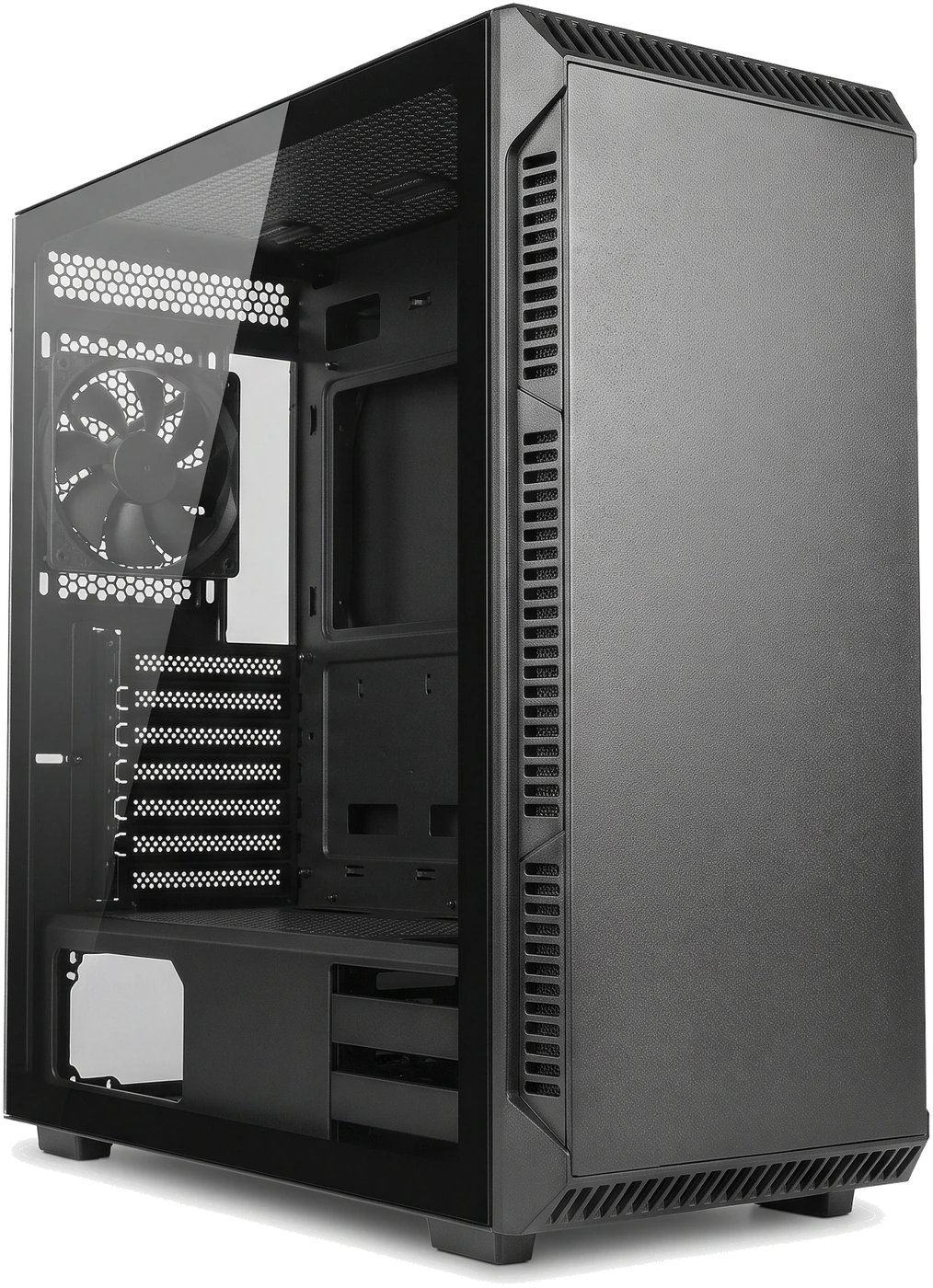
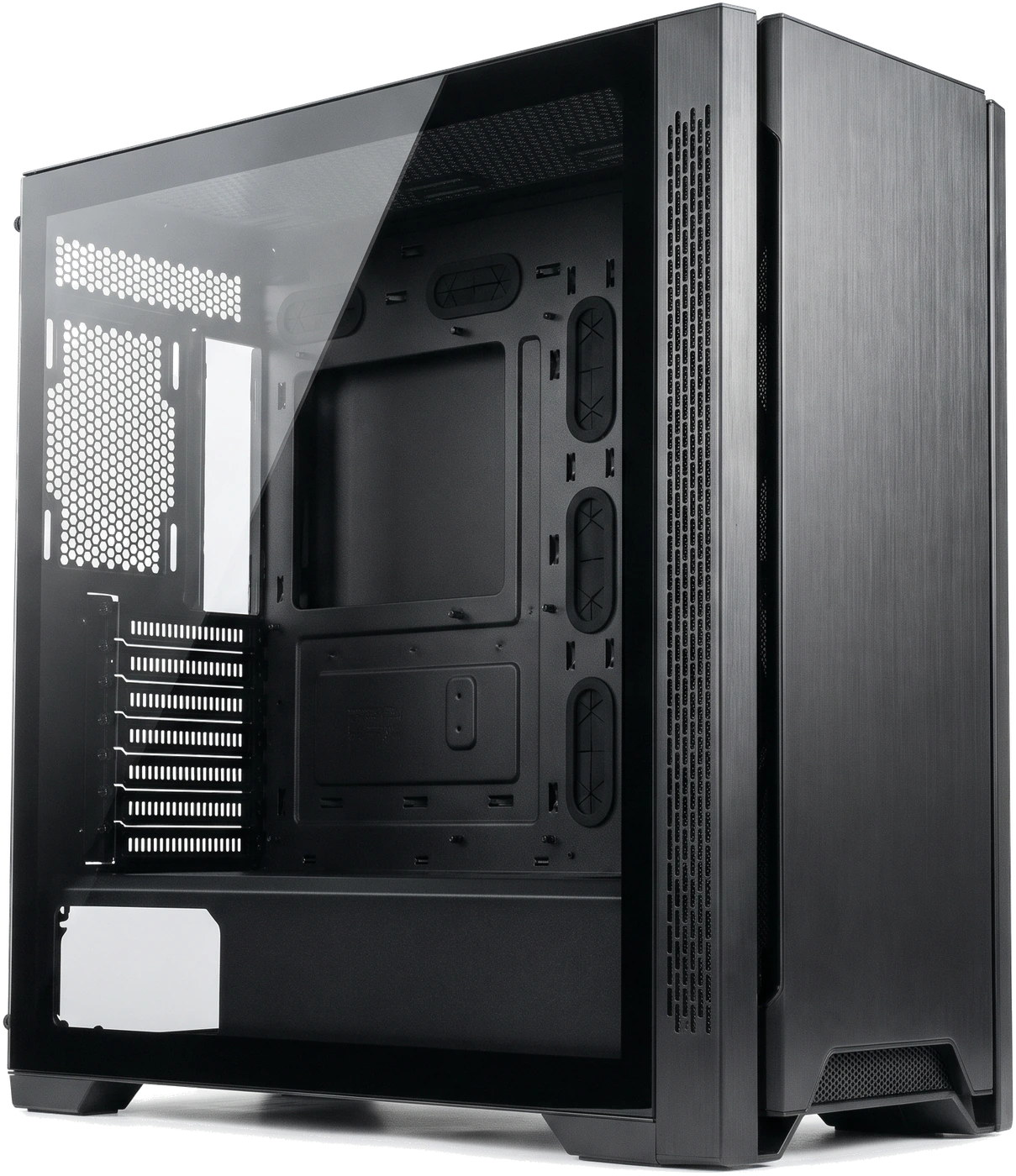
Empty black Mid Tower computer case angled to display the internal motherboard plate, rear fan, expansion slots, lower power supply bay and front buttons/ports.
Empty Mid Tower desktop computer case (chassis) with clear side panel showing the motherboard plate, cable holes, rear fan, expansion slot brackets, bottom Power Supply Unit (PSU) bay and front ports.

Overview

The computer case (chassis) houses, protects and supports all internal parts while guiding cooling air inside the system and deciding how big every part can be.

A good case keeps dust out, holds delicate circuit boards safely away from bare metal on raised brass posts (standoffs), locks heavy graphics cards firmly to its frame and keeps cables tidy behind the scenes so nothing blocks fans.

Cases are built around standard motherboard sizes (Advanced Technology eXtended (ATX), smaller Micro Advanced Technology eXtended (Micro-ATX or mATX), and compact Mini Information Technology eXtended (Mini-ITX)). Always pick a case that comfortably fits your motherboard, Graphics Processing Unit (GPU), Central Processing Unit (CPU) cooler and PSU rather than choosing on looks alone.

Important Parts and Features

Looking inside the empty Mid Tower above shows the main physical features every builder and user interacts with:

01Recessed metal backplate inside the case

Motherboard Plate and Raised Brass Standoffs

Flat wall with screw holes that support the motherboard. Small brass posts elevate the board safely off bare metal so circuits cannot short out, and a big cut-out gives rear access behind the CPU.

02Seven horizontal metal covers (bottom left)

Rear Expansion Slots

Openings at the back where dedicated graphics cards and add-in cards line up and screw tightly into the steel frame.

03Bottom-left compartment under a shroud

Power Supply Bay

Isolates PSU cooling air through a removable bottom dust filter while hiding extra cable slack neatly underneath.

04Behind the plate & under the bottom cover

Storage Drive Trays

Hold 3.5-inch Hard Disk Drives (HDDs) and 2.5-inch Solid-State Drives (SSDs). (Most modern cases omit older front optical disc drive bays.)

05Front, top, rear and bottom grilles

Fan and Radiator Mounts

Slotted mounts for 120 millimetres (mm) or 140 mm case fans and liquid cooler radiators.

06Top/front outer edge

Front Buttons and Ports

Holds power/reset buttons, headphone socket, Universal Serial Bus (USB) ports and often USB Type-C (USB-C), wired internally down to the motherboard.

07Front grille, top mesh & under the PSU

Mesh Vents and Washable Dust Filters

Let cool air in while fine slide-out screens catch household dust and pet hair before it coats heatsinks.

08Channel behind motherboard / tempered glass or steel door

Hidden Cable Routing Space & Side Panels

Space (around 20 to 30 mm) behind the backplate hides power cables neatly; removable glass or steel side doors protect everything inside.
Types & Classifications

Computer cases are grouped into four size categories. Be careful: names like "Mid Tower" are general labels, not strict dimensions, so two Mid Towers can differ by 60 mm in graphics card clearance!

A

Full Tower

Tall Full Tower desktop computer case with spacious interior clearance and multiple cable pass-throughs.

Tall, heavy enclosures supporting full Extended ATX (E-ATX) and standard ATX boards, vast drive racks and huge coolers. Unnecessarily large and expensive for most people unless building a multi-drive workstation.

B

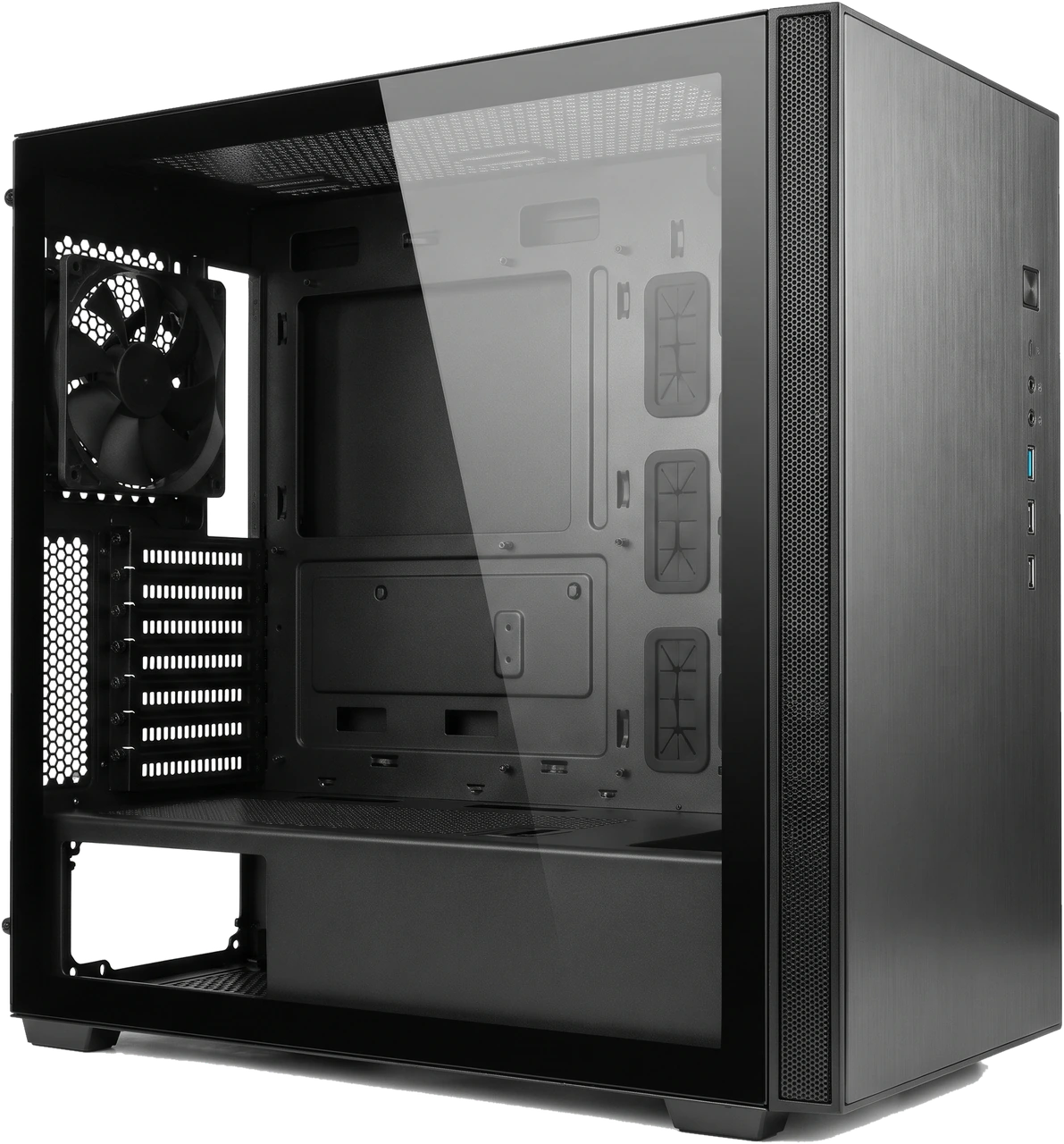
Mid Tower

Empty black Mid Tower desktop computer case with glass panel, rear fan and bottom power supply shroud.

The everyday desktop standard, fitting standard ATX, Micro-ATX and Mini-ITX boards comfortably. Gives first-time users plenty of room to plug in cables, fits mainstream graphics cards and coolers, and delivers great airflow without dominating the room.

C

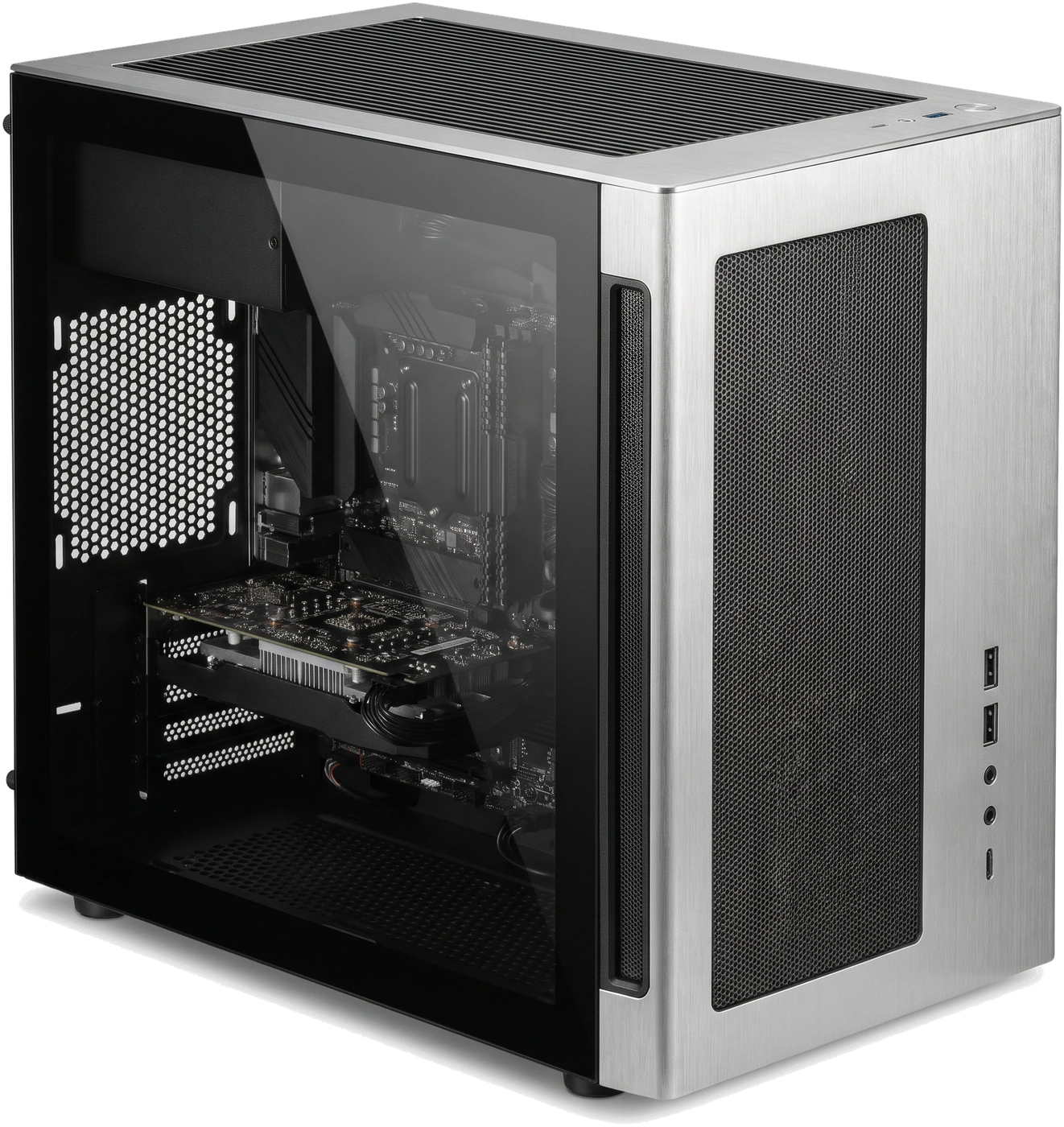
Mini Tower

Brushed-silver Mini Tower computer case housing a compact Micro-ATX build.

A shorter box made mainly for Micro-ATX and Mini-ITX motherboards (note the compact layout pictured). Saves desk height, though lower drive bays and front fans can squeeze very long graphics cards and power supplies tightly.

D

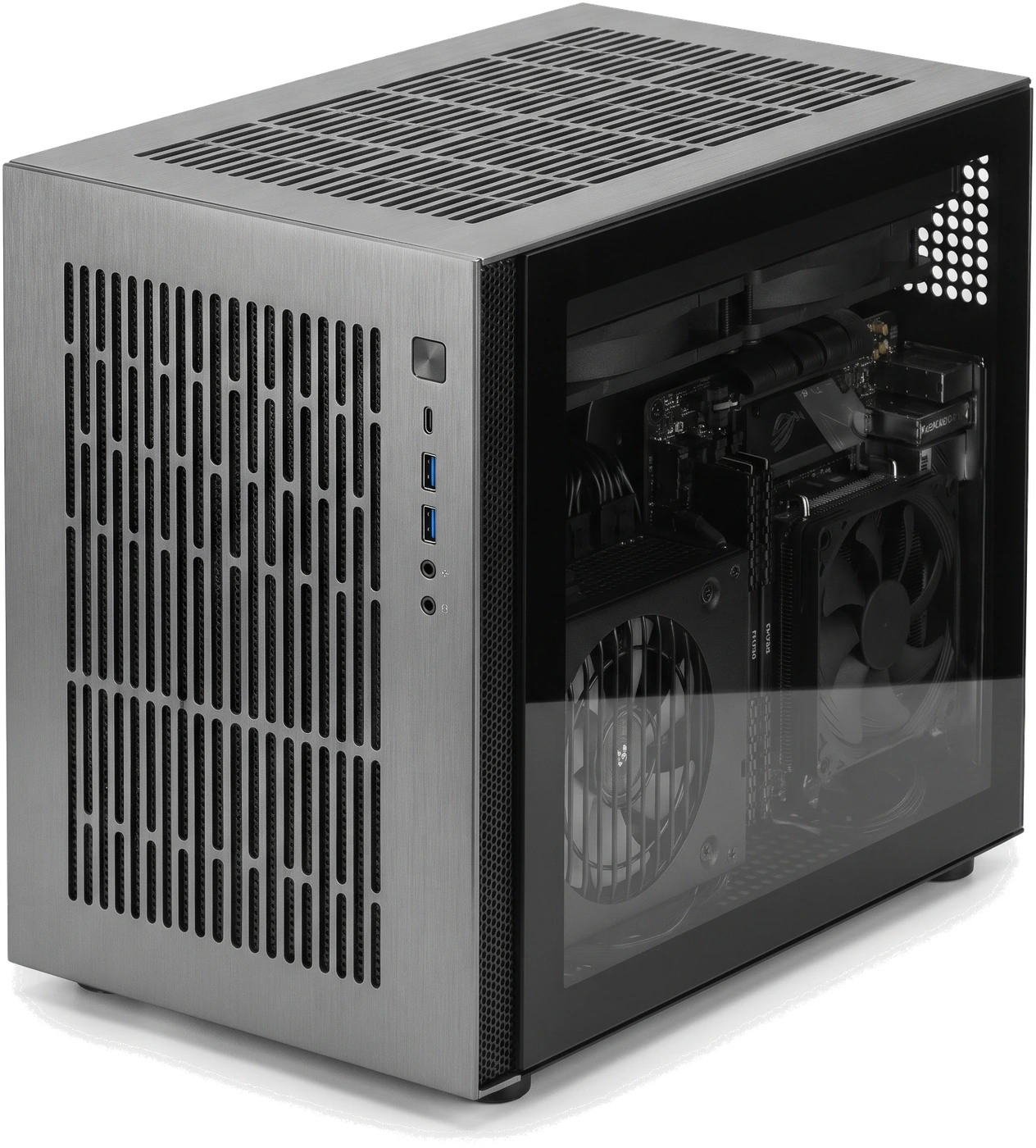
Small Form Factor (SFF)

Compact cube-style Small Form Factor (SFF) desktop case holding tightly packed components.

Ultra-tiny cases built around Mini-ITX boards (and usually smaller Small Form Factor eXtended (SFX) power supplies, low-profile coolers and shorter graphics cards). Demands extra care checking every single millimetre before buying.

Case Size Categories Compared

Verify exact clearances in millimetres on the case spec sheet rather than trusting size labels alone.

Case Size Categories Compared
CategoryMotherboards FittedBuilding Ease & SpacePractical Watch-Outs
Full TowerE-ATX, ATX, mATX, Mini-ITXVery roomy for huge buildsHeavy, bulky and unnecessary for normal single-graphics-card Personal Computers (PCs)
Mid TowerATX, mATX, Mini-ITXBest balance of space, airflow and budgetStill check long triple-fan GPU room if fitting a front radiator
Mini TowerMicro-ATX, Mini-ITXNeat shorter footprintTighter limits on long GPUs, tall coolers and big PSUs
Small Form Factor (SFF)Mini-ITX mostlySmall portable sizeStrict part limits, warmer airflow and trickier assembly

Buying Guide: Five Checks Before Ordering a Case

Every case product sheet lists five clear measurements in millimetres. Check your parts directly against them:

1. Motherboard Size Support

Confirm ATX, Micro-ATX or Mini-ITX is listed. Bigger cases normally accept smaller boards too, never the reverse.

2. Maximum Graphics Card Length and Side Room

Compare your chosen card length against the case limit (subtracting ~30 to 55 mm if installing a liquid radiator at the front!) and ensure wide enough clearance toward the side panel so power plugs (especially 12-Volt 2x6-pin (12V-2x6)) do not bend sharply.

3. CPU Cooler Height and Radiator Positions

Compare your air cooler height in mm against the case ceiling, or confirm exact 240/280/360 mm top/front radiator space.

4. PSU Format and Length Plus Drive Bays

Check whether the case takes standard ATX or small SFX PSUs, check max PSU depth against removable Hard Disk Drive (HDD) cages, and count 2.5-inch / 3.5-inch drive spots.

5. Front Airflow, Included Fans & Front USB-C

A perforated mesh front cools parts much better and more quietly than a sealed glass front! Count how many fans already come in the box, and confirm your motherboard has a matching internal header if you want the front USB-C port to work.

Front Panel Styles Compared

Front Panel Styles Compared
Front Panel TypeCooling & Fan NoiseEveryday Practical Advice
Open Mesh FrontCoolest temperatures and quieter fan speeds under loadBest overall choice for almost every desktop build; easy wipe-down filters.
Solid Metal or Glass FrontHigher fan speeds needed through slim side slitsAvoid with hot gaming/workstation parts unless wide mesh side intakes provide airflow.
Sound-Dampened PanelsQuieter mild hum at idleCan hold heat in during heavy loads, forcing fans to spin faster anyway.
Sensible Purchasing

Start in a Well-Ventilated Mesh Mid Tower Unless You Need Tiny

A quality mesh Mid Tower with two or three included fans makes your first build dramatically easier, keeps temperatures down silently and leaves room to upgrade later without headaches.

Compatibility: What Must Match

Check every key measurement inside the chassis against your parts list.

Case + Motherboard

ATX / Micro-ATX / Mini-ITX fit, brass standoff placement and matching internal headers for front USB-C and buttons.

Case + GPU

Max card length (minus front radiator/fans), slot thickness and side-glass cable clearance.

Case + PSU & Storage

ATX vs SFX size, max PSU length in mm against lower drive trays and drive mount count.

How to Verify Exact Case Clearances

  1. Open the official case product page (such as Corsair, Fractal Design, NZXT, Lian Li or be quiet!) to read all maximum dimensions in mm rather than relying on retailer summaries.
  2. Check whether any front fans are already installed and verify USB-C header requirements against your motherboard manual.

Maintenance, Problems and Replacement

A computer case lasts across multiple PC upgrades when dust filters are cleaned regularly and tempered glass panels are handled gently.

Basic Maintenance

  • Pull out removable mesh dust filters every 1 to 3 months, vacuum or rinse gently, and let them dry 100 per cent before sliding them back in.
  • Keep at least a hand-width of open breathing room behind and around the tower, avoiding enclosed cabinets with closed doors.
  • Clean tempered glass gently with a soft microfibre cloth and never rest a glass edge directly onto ceramic tile, stone or concrete floors.

Common Problems and Possible Causes

  • Front USB or USB-C port does nothing: Internal case cable came loose at the motherboard edge, or the motherboard does not have that matching socket.
  • Everything runs very warm and noisy despite fast fans: Dust-choked mesh filters, blocked intake vents pushed against carpet/walls, or poor airflow behind a sealed front panel.
  • Ticking, buzzing or rattling sound: A loose side-panel screw, vibrating drive sled, or a loose wire lightly touching spinning fan blades.

Signs It May Need Replacement

  • Upgrading to a long graphics card, big CPU cooler or ATX motherboard that physically will not fit inside an older small enclosure.
  • Permanently broken power switch, crushed frame or blocked airflow causing chronic overheating.

What to Check Before Replacing

  • Check every existing component size (motherboard form factor, GPU length, CPU cooler height, PSU length and drive bays) against the new case specifications.
  • Remember that moving into a new case means unplugging and moving every part across: take photos of your motherboard wiring first and keep spare screws and standoffs separated.

What You Can Usually Do Yourself

  • Washing dust filters, tightening loose screws, fixing a wire brushing a fan blade or swapping worn case fans.
  • Moving your hardware into a new case carefully following step-by-step instructions.

When to Get Professional Help

  • Full case transfer if you prefer not to disconnect and reconnect all motherboard, power and front-panel wiring yourself.

Common Buying and Usage Mistakes

Important Safety Note

Protect Tempered Glass From Hard Floors & Remove Extra Standoffs

Touch a tempered glass corner gently against tile, marble or concrete and it can shatter instantly into thousands of pieces, so always lay glass down flat on a soft towel, bed or table. Inside the case, remove any brass standoff that does not match a screw hole on your motherboard so bare metal cannot short out the underside of the board.

Choosing strictly by looks without checking airflow or part lengths

Components overheat behind sealed panels or physically fail to fit on build day.

Assuming any "Mid Tower" fits every large graphics card or tall air cooler

Card hits front fans or cooler tips stop the glass door from closing.

Ordering a full ATX motherboard for a Mini Tower case

Standard ATX boards are roughly 61 mm taller and do not fit Mini Towers.

Paying for front USB-C ports when the motherboard lacks a front USB-C socket

The port sits permanently disconnected without an adapter.